
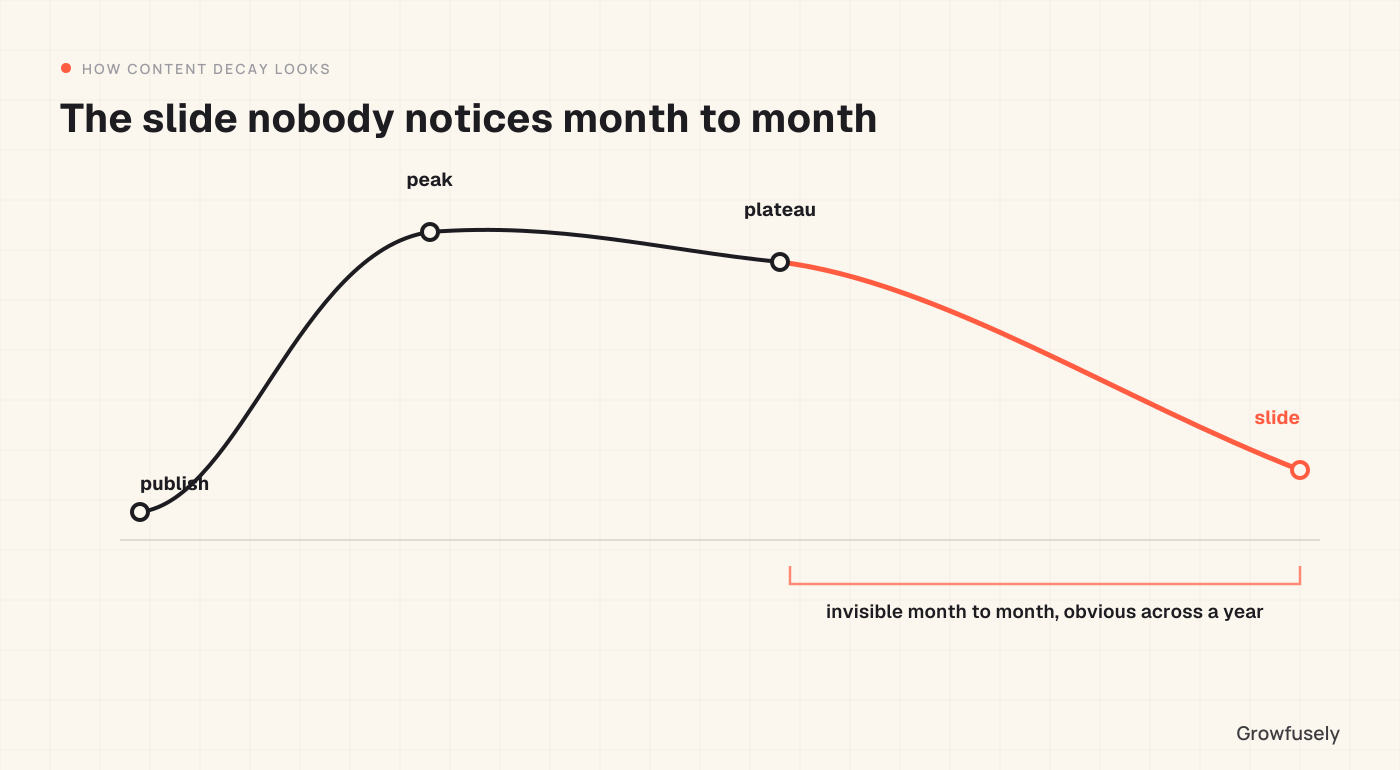
Quick answer: Content decay refers to the decline of traffic and ranking of once successful pages. These pages stay static even as the subject matter, competition, and user demands evolve. This phenomenon is not visible month after month, but it becomes very evident year after year. Decay is also the most reversible reason for organic decline, which is why it is important to understand the issue properly. Refreshing content works only if there is content decay and not otherwise.
Content failure rarely happens suddenly. Here’s the typical cycle: content gets created, becomes popular, reaches a plateau, and then starts declining. This can go undetected from month to month, which makes it tricky. By the time someone notices, a page that used to bring qualified visitors every week brings only a handful. It can be difficult to pinpoint when these results changed.
This happens much quicker for SaaS companies than most others. Your product changes, competitors release their own offerings, the tools you mentioned get acquired/rebranded, and the process you explained gets rewritten. A post about workflows, for example, can become outdated or irrelevant in less than eighteen months even without any changes being made to it.
What Causes Decay
The four main cases of decay tend to overlap. Let’s find out what they are.
1. The Data Became Outdated
We’re talking about stats from three years ago, lists of tools that are not extinct, screenshots of interfaces that have been redesigned, and prices that have changed, among other things. This type of decay is easy to notice, and simple to solve.
2. Your Competitors Stepped Up
Your rival simply created a superior page. Your page didn’t become worse per se, but it is no longer the best choice, and search results are always relative.
3. Search Intent Evolved
What users seek when they ask a certain question is constantly evolving. A query that used to expect a definition now looks for a comparison, or a how-to query now expects a template. Basically, your page is still answering an older version of the question.
4. The Format Aged
Wall-of-text pages cannot compete with well-structured ones. Pages that don’t have answers in the beginning can’t compete with those that have them at the very top. This is especially important because AI engines now extract passages instead of reading entire documents.
How to Spot It in Your Own Content
Decay hides from month-over-month reporting, which necessitates a structured approach to identifying it.
Compare Over the Course of a Year Instead of a Month
In Search Console, compare the most recent six months with the corresponding six months a year ago. Arrange by a difference in the number of clicks, in descending order. The lowest-ranked pages on the list are the candidates for decay.
Apply an Age Filter
Extract the pages that have lost traffic and check their publication date. Decay is found only on pages more than about eighteen months old. If all of your losing pages are recent, you are probably looking at something other than decay.
Check Page Position Along with Click-Through Rates
If both the position and the clicks have fallen, you either have decay or competitive displacement. If the position stays stable while clicks decline, that is absorption, which is a different problem with a different fix. We cover that pattern in impressions up, clicks down.
Consider the Nature of the Drop
Decline is a slope. A cliff suggests an event that took place on a certain date: a technical evolution, a mass migration, or an algorithmic update.
Sanity Check the Content Itself
Open up the five worst performing pages and read them like someone reading them for the first time. Outdated references tend to make themselves obvious very quickly.
Not Every Decaying Page Deserves a Refresh
This is where most refresh programs waste effort. A list of pages experiencing a drop in performance does not translate into a task list. Page rankings drop for various reasons and some of them don’t deserve much attention.
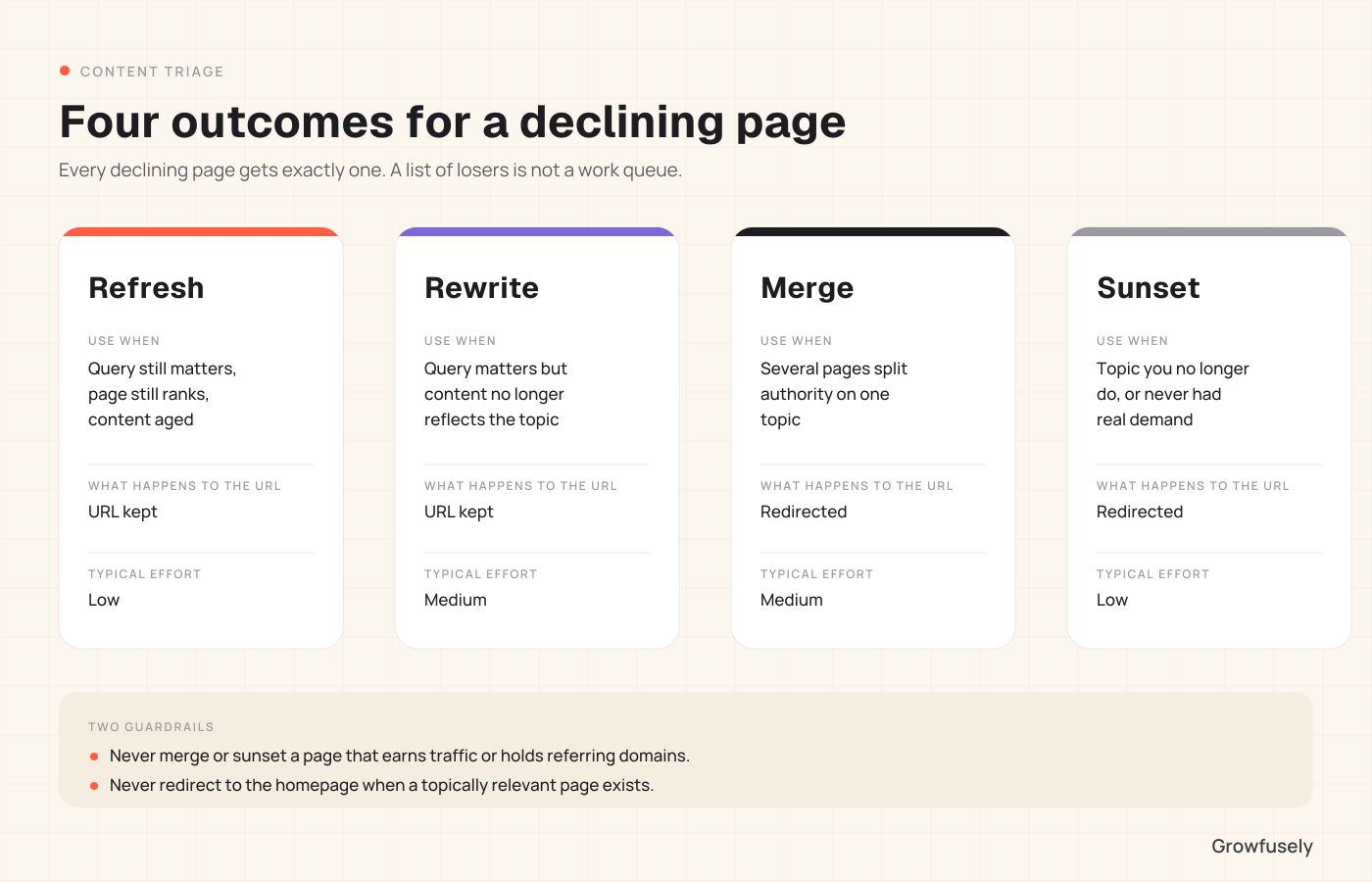
Here are four potential outcomes, and each declining page gets exactly one.
1. Refresh: The page ranks for a query which is still relevant, it continues to rank reasonably. The reason its performance drops is its outdated content. It’s best to refresh the material rather than change its date stamp. This is the highest-return work on the list.
2. Rewrite: The page targets a query that matters, but the content no longer represents your thinking on the subject or what the topic demands. Building anew is faster than fixing the old page, and the URL retains its past.
3. Merge: There are multiple pages that overlap in subject matter, diluting each other’s authority. Move the good stuff from each page to the most authoritative one, and redirect them into it. You end up retaining their accumulated substance and link value.
4. Sunset: You have a page targeted at something you no longer do, you no longer wish to be recognized for, or which simply had no real query volume to begin with. 301 it to the nearest relevant page you have left alive. Deletion can be extreme, but is often the highest-leverage move possible, as less is more where content libraries are concerned.
Two important principles to note here: Don’t sunset or merge a page that currently drives significant traffic or has referral domains, as you’ll trade certainty for a hunch. And don’t send anything to the home page unless you have a topically-relevant page available.
What a Refresh Should Actually Change
Merely changing the year in the page title is not a refresh. Also, republishing the same content with a new date is an approach that search engines can easily detect.
Make these adjustments to the page to make it more relevant:
- Replace what is factually out of date. Statistics, tool names, pricing, screenshots, process steps.
- Provide information the user expects to see. If pages ranking on your target query are all of a particular type (a table comparison, template, data), then it is this missing information which is holding you back.
- Adjust structure to support extraction. Include a clear answer at the beginning. Use question- form headings, if relevant to the search. Divide the document into sections that can stand alone because engines extract text fragments and not whole pages.
- Include something unique in the page. We’re talking original data, examples, and practice tips. This elevates a citation above a summary, and is the most important step in modern times.
- Fix your internal links. The older pages might link to pages you’ve since merged or removed. Fix the links and create new links from your refreshed pages to the commercial pages it should support.
Preventing Decay Rather Than Repairing It
Mentioned ahead are a few ways to prevent decay from the beginning so that the need for fixing it doesn’t arise at all.
- Give every published page a review date: One year for pages containing statistics, tools, or process description. Two years for evergreen conceptual pages. A simple calendar reminder does the job.
- Maintain only a small enough library: Every page you publish needs to be maintained by someone. One hundred well-maintained pages will beat out four hundred un-maintained pages, and the un-maintained pages will actively dilute the message of your site.
- Publish fewer decaying pages: Pages built on original data, real case studies, and sustainable principles decay slower than those built on current tool lists and current year statistics.
- Run an audit twice a year: Twice a year, spend two half-days, reviewing your library versus the previous year and triage losers into the four categories listed above.
Where to Start
A twice-yearly audit is pretty straightforward, but few teams conduct one as the triage is the difficult part, not pulling the data.
Want to get the triage right? We can do that: year-over-year analysis, classification of causes by page, refresh, rewrite, merge, or sunset of each page, and a sequenced plan starting with the pages nearest to the pipeline.
Book a discovery call and we’ll scope it for your library.
Frequently Asked Questions
How often should we refresh content?
Conduct annual reviews, and refresh only when the review identifies a legitimate reason. A process that requires unnecessary refreshes only generates cosmetic revisions, which are of no use at all.
Does republishing with a new date help?
Only if the content really is refreshed. Date stamps reflect content, not a content refresh.
Should we refresh or write something new?
The refresh process is generally easier than writing a brand-new page and begins from an established foundation of links. When writing new content, the search query should be different enough from any current content.
How do we know a refresh worked?
Establish a baseline before publishing: clicks, impressions, and average position for the main keywords on that page. Verify at four weeks, and then again at twelve. A well-established site will move quicker than the commonly quoted timelines suggest.
Is deleting old content risky?
Not if it’s redirected somewhere else. Redirection of a completely dead page to an existing relevant page is a very common and recommended practice. The danger lies in the deletion of pages which continue to receive traffic or have links to them.

Pratik Dholakiya is the Founder of Growfusely, a SaaS SEO and AI Search Visibility agency.
