Quick answer: Post-migration traffic loss is almost always due to bad redirects, broken URL remapping, missing internal links, lack of metadata, crawl blocking, or non-rendered content. The right checks should be performed in the order outlined below, with the quickest test performed first. All of this is recoverable, and the sooner it’s spotted the better.
It’s common to lose some traffic for a while after a migration, since search engines need to recrawl and re-evaluate your new website. A drop in traffic that recovers within several weeks is expected.
What is uncommon is if the traffic does not come back even after six weeks, or if the traffic drop was big enough that it became apparent in a matter of days. Something is broken in this case. Fortunately, it can be fixed in a way that an algorithmic loss can’t be.
Another piece of good news: post-migration problems have a short list of usual suspects. Working through them in order finds the cause most of the time.
Before You Start: Establish the Timeline
Two queries arise here, both of which can be answered using Search Console.
1. Is the drop associated with the date you migrated to HTTPS?
If the drop coincides with just a few days of the migration, then the migration is likely the culprit. But if it occurred even before the migration went live, then your problem lies somewhere else and the migration has little or nothing to do with it.
2. Is it a site-wide problem or section-specific?
Filter by page and directory to determine if the drop is a site-wide one or section-specific. A sitewide drop points to crawling, indexing, or template-level problems. A drop confined to certain sections points to redirect or URL mapping failures in those sections.
Check 1: Redirects
The most common problem, and the easiest to check.
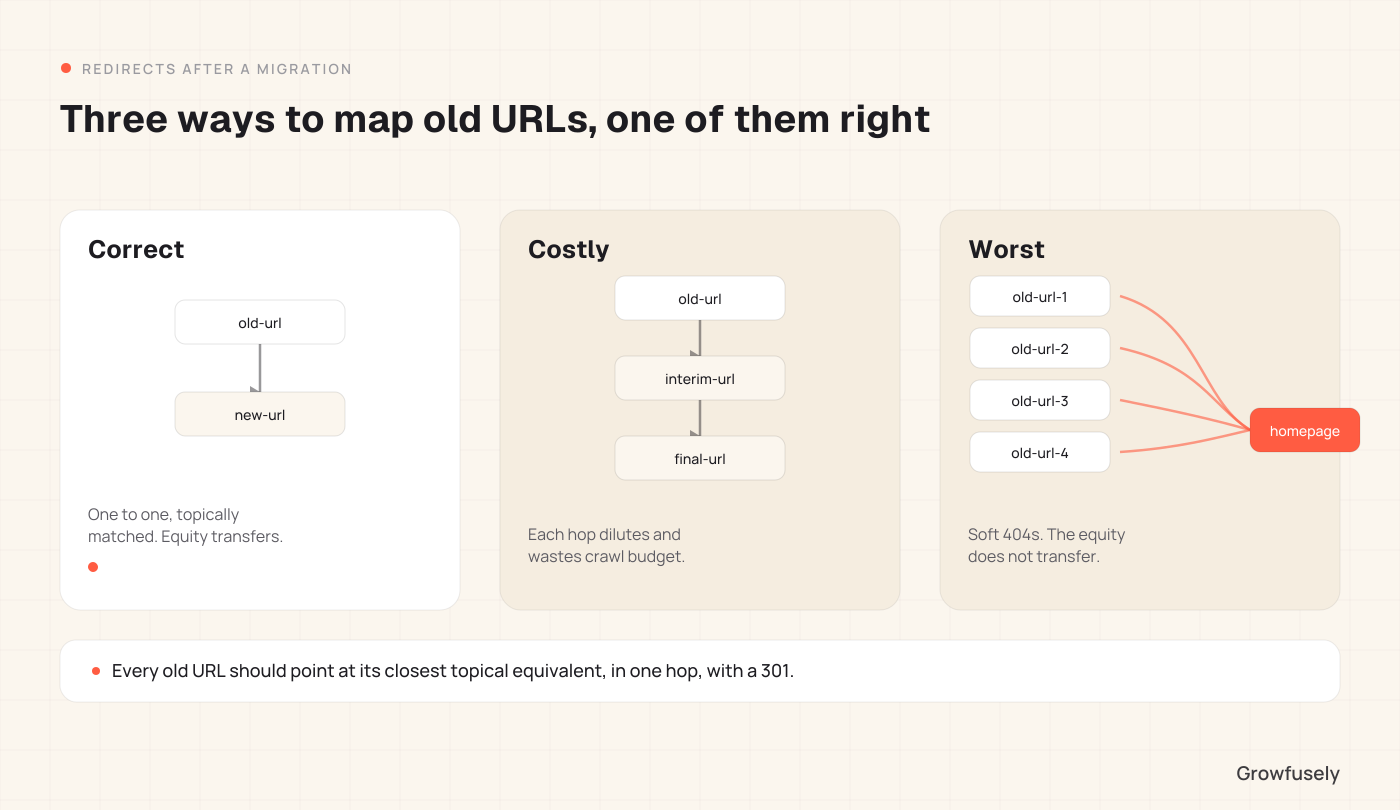
Does every old URL redirect to a relevant new one? Run a crawl on your pre-migration list of URLs and check the status of each one. Any URL coming up 404 means the page is losing all its accumulated authority.
Is any URL being redirected to the home page? This happens a lot and is very detrimental to your site’s authority. Search engines will see an irrelevant redirect as a soft 404, and no equity will be passed. All URLs must point to their closest related URLs.
Are there redirect chains? Old URL to intermediary URL to new URL is a waste of time, effort, and crawl budget. All redirects need to point straight to where they need to go.
Are the redirects permanent? Use 301 for permanent redirects. A 302 tells search engines that the URL needs to be kept because the redirect is temporary.
Even if you don’t notice any other issues in the entire checklist, fixing your redirects will usually do the trick.
Check 2: Crawling and Indexing
Robots.txt: Staging environments block crawlers, and sometimes this file is released in production mode. No other single test accounts for post-launch crashes as much as this one does.
Noindex tags: Same story. A broad noindex tag set on staging, which somehow makes it through production, will make your site disappear in just a few days.
Coverage report: Check the number of indexed pages both before and after. The difference will show you how many pages you’re losing, and the exclusions will show why.
XML sitemap. Does it list the new URLs, and is it submitted? An outdated sitemap pointing at retired URLs slows recrawling considerably.
Check 3: Content and Metadata
Did the content actually make it across? Did the actual content survive the migration process? It is surprising how many sections are left behind in migration processes, especially sidebar content, FAQs, and any information that was not in the content body of the old CMS.
Title tags and meta descriptions: Some platforms will automatically generate title tags and meta descriptions from templates when importing, overriding the manually-crafted content. Spot check your top fifty pages.
Heading structure: Template changes sometimes convert H1s to H2s, or wrap headings in styling that nullifies their semantic meaning.
Structured data: Many times, schema markups implemented on the old site are lost during a platform switch, making extraction harder for AI engines.
Images: Alt text and file names get lost in bulk migrations, and image search traffic disappears quietly.
Check 4: Internal Linking
The most underestimated item on this list.
Every migration recreates navigation and templates, which results in the loss of contextually-based links, once used to pass authority throughout the website. Your page may survive with its content and redirection intact, but it may rank poorly since it doesn’t have twenty internal links pointing to it anymore.
Compare internal link counts to your important pages pre- and post-migration. If you keep a crawl of the old site, this is easy to do.
Make sure that links in content are going to new URLS directly and not redirecting again and again. Every hop dilutes.
Confirm your navigation and footer still link to the pages that matter, since template rebuilding usually reduces these.
Check 5: Rendering
This is crucial for SaaS sites, where marketing pages use the same architecture as the product.
Use the URL Inspection tool in Search Console and look at the rendered HTML, not the source. Is your main content present in what Google actually sees?
If the new site is JavaScript-heavy, make sure that the content renders automatically. Content that requires user interaction to show up might not get indexed.
Check that critical content is not behind lazy loading that fails for crawlers.
Check 6: Speed and Page Experience
Compare Core Web Vitals before and after launching the new website. Many times, new designs are heavier, so the site becomes noticeably slower.
Check mobile rendering specifically, because mobile-first indexing means that Google uses the mobile version of the site.
Look for layout shifts introduced by new hero images, embedded widgets, or ad slots.
How Long Recovery Should Take
If you fix the cause within the first few weeks, most sites recover substantially within four to eight weeks of the fix, with established sites often moving faster. Recrawling takes time, and rankings return as pages are reassessed.
Two things slow recovery. For one, fixes applied months later recover less completely, because the lost signals have had more time to settle. Secondly, multiple overlapping problems recover in stages rather than all at once, which makes progress look slower than it is.
If nothing has moved twelve weeks after a genuine fix, the migration was probably not the whole cause. Run the broader diagnosis in why your SaaS traffic dropped to check whether decay, displacement, or answer absorption is also in play.
Preventing This on the Next Migration
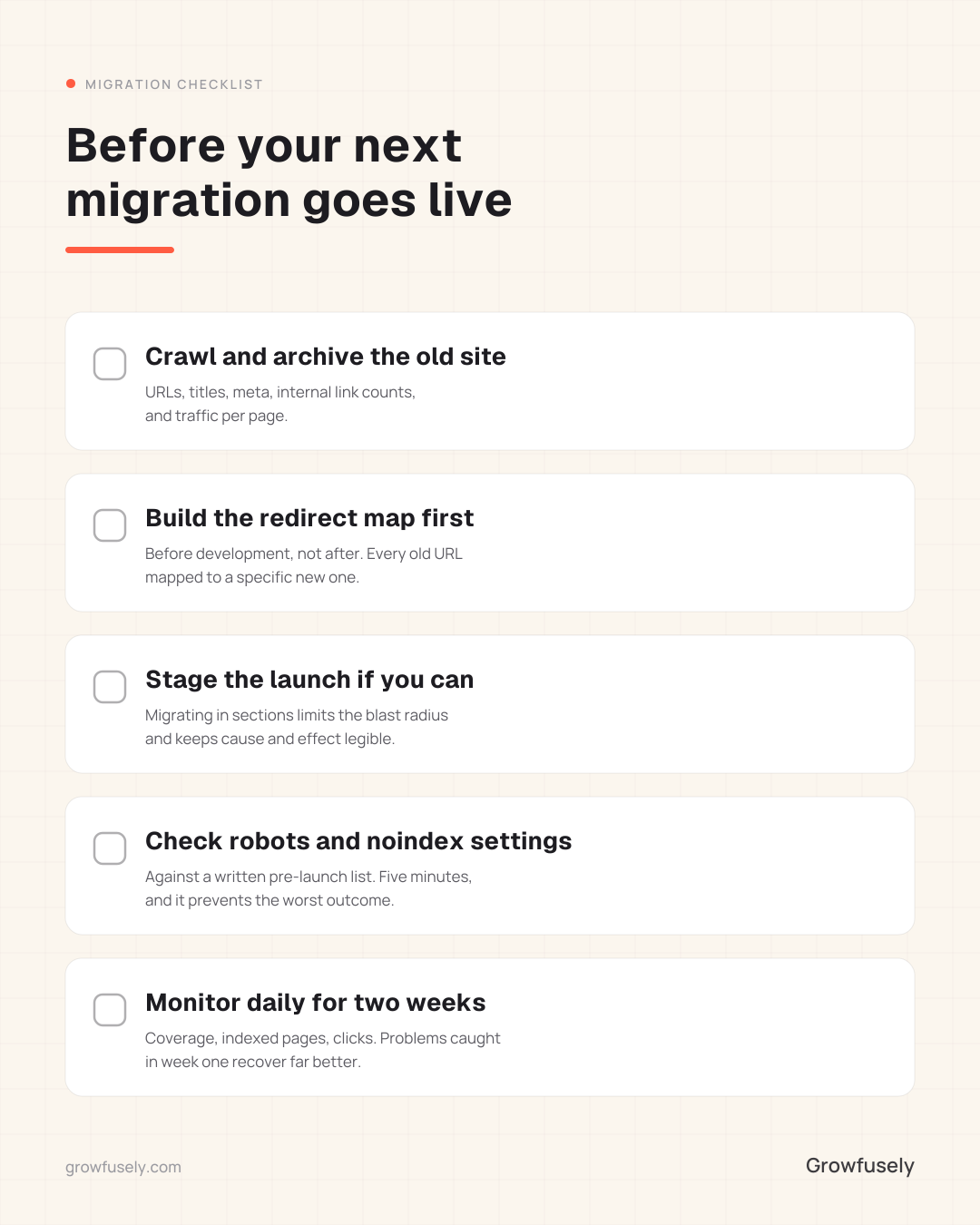
Crawl and archive the old site before launch: URLs, titles, meta descriptions, internal link counts, and traffic per page. Without this baseline, diagnosing problems afterward becomes guesswork.
Build the redirect map before the development phase: Every old URL mapped to a specific new URL, reviewed by someone who understands which pages are important.
Stage the launch if you can: A staged migration keeps the impact contained and helps determine the root cause.
Check the staging environment’s robots and noindex settings against a written pre-launch list. This costs five minutes and prevents the worst outcome on this page.
Monitor daily for the first two weeks. Coverage, indexed pages, and clicks. Problems caught in week one recover far better than those detected three months down the line.
Where to Start
If your migration is weeks behind you and traffic has not returned, the priority is finding the cause quickly. Why? Because the longer a problem lingers, the recovery completeness drops.
This is the work we do: crawling the before and after states, checking redirects and indexing, comparing internal link distribution, and handing you a prioritized fix list with the highest-value pages first.
How much traffic loss is normal after a migration?
A short-term decline in traffic while Google re-crawls may be expected, with the site returning to its former levels in about a month. Any drop that continues beyond six weeks or drops into double digits is not a short-term effect, but indicates that something is wrong.
Should we keep the old URLs if we can?
Yes, if you can. Adding another variable, such as changing URLs during a redesign, brings an added element of risk which almost never justifies the new design.
Can we restore lost traffic even a year later?
Yes, partially. It is always beneficial to solve redirections and indexing problems no matter how long ago the migration took place. Treat it as reclaiming a portion rather than restoring the previous state.
Do we need to resubmit the sitemap?
Yes. Update it to the new URLs and submit it in Search Console. It does not force anything, but it accelerates discovery meaningfully.
Should we tell Google about the move?
If the domain changed, use the Change of Address tool in Search Console. If only the site was redesigned within the same domain, all you need is redirects and a sitemap update.


 About Growfusely
 White LabelMake us your (hidden) helping hand in delivering high-quality work to your SaaS clients.
 TeamCheck out the faces (and their backstories) behind our brand.
 Partner With UsJoin forces with us and earn a recurring monthly commission.
 Careers We're HiringJoin our growing team of passionate content marketing geeks.
 SEO & AI Search VisibilityBoost your search engine rankings with a blend of compelling content and technical tweaks.
 Content Strategy & ProductionFuel your brand awareness and user acquisition with strategic content creation and distribution.
 Authority & CitationsEarn relevant, high-quality backlinks from top websites in and around your niche.
 SaaS InfographicsLearn battle-tested best practices on all things SaaS marketing — visually.
 SaaS InterviewsRead our tête-à-têtes with SaaS marketing experts on achieving content-driven organic growth.